
In Stock
| Main Features | ||
| Operating System | CR10E and CR10M are documented for Windows hosts; the CR10M/W development protocol is documented for 32-bit Windows. Verify the intended computer and software version. | |
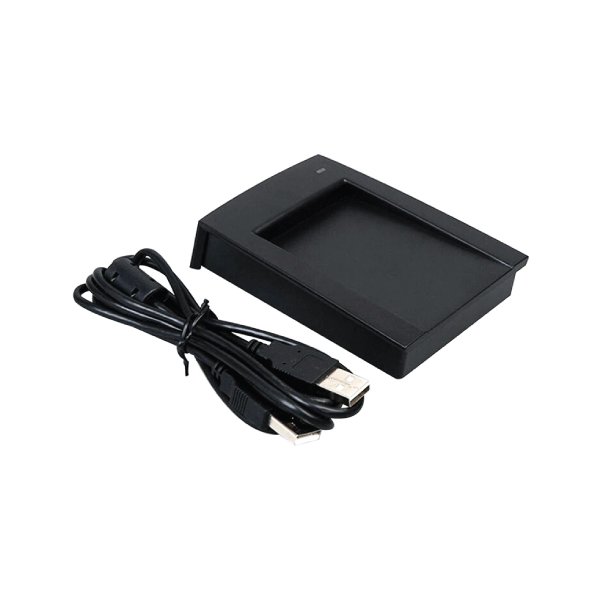
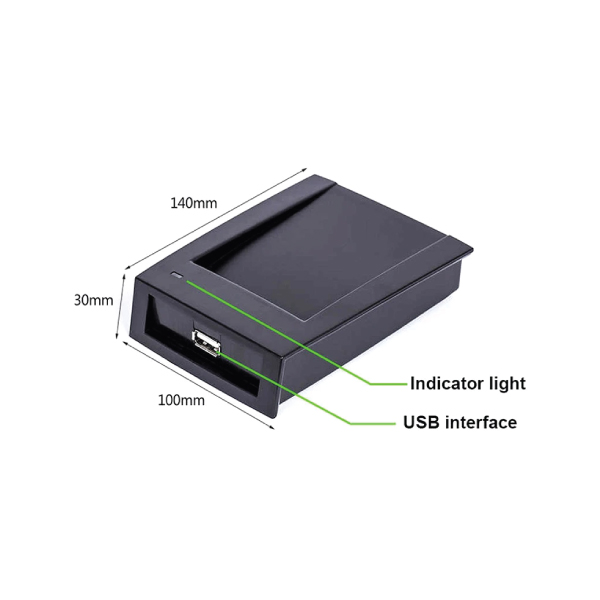
| Hardware | Desktop USB proximity-card enrollment reader with two-color LEDs and a beeper. | |
| Authentication Method | Proximity-card number reading for enrollment; no standalone door authentication. | |
| Card Type | CR10E: 125 kHz EM; CR10M: 13.56 MHz MIFARE; CR10M/W: compatible 13.56 MHz MIFARE. | |
| Card Reader | Integrated contactless RFID reader; frequency and read/write ability depend on the variant. | |
| Read Range | CR10E up to 10 cm; CR10M and CR10M/W up to 5 cm. Actual range depends on the card and hardware revision. | |
| Input Port | USB connection to a host computer; no separate external control input specified. | |
| Output Format | Card number over USB. Manufacturer documentation describes keyboard emulation for CR10E/CR10M and a development communication protocol for CR10M/W. | |
| LED | Two-color red and green LED indicators. | |
| Communication | USB connection to a computer. | |
| Standard Functions | Compatible card-number reading for enrollment, USB connection, LED feedback and beeper feedback. | |
| Visual Indicator | Red and green LEDs. | |
| Audio Indicator | Built-in beeper. | |
| Physical Specification | ||
| Power Voltage | USB 5 V DC. | |
| Power Current | CR10E and CR10M: maximum 100 mA | |
| Operating Temperature | CR10E/CR10M, −10°C to +70°C; CR10M/W, 0°C to +70°C. Confirm the supplied revision. | |
| Operating Humidity | 10% to 90% | |
| Material | Textured ABS+PC housing. | |
| Dimensions | 140 × 100 × 30 mm. | |
| Manufacture Warranty | ||
| Warranty | 1 Year | |
Adding a new employee's access card should take seconds at the registration desk. The ZKTeco CR10 USB Proximity Card Issuer reads a compatible RFID card and sends its number to a computer, where an administrator can assign it to a person in supported software.
If you are comparing the ZKTeco CR10 price in Bangladesh, Touch IT offers this product at ৳1,800. The name CR10 covers different card-frequency versions. Confirm whether the supplied unit is CR10E, CR10M or another variant before choosing cards or planning a software rollout.
The CR10 is designed for the point where cards are registered, not the point where a door opens. Place it beside a PC, present the appropriate card, and capture the card number in a compatible enrollment field. ZKTeco's user guide describes this workflow for cardholder and visitor registration. It can save staff from repeatedly typing card IDs and help keep the enrollment process consistent in a larger access control installation.
A single USB connection carries power and card data, so a separate power adapter is unnecessary for the documented CR10E and CR10M readers. ZKTeco describes keyboard-style output: put the cursor in the appropriate software field and present a card to enter its number. The application still needs to be configured to accept that number.
CR10E serves systems using 125 kHz EM cards, while CR10M serves 13.56 MHz MIFARE cards. They are distinct versions, not two modes on every CR10 reader. Check a sample card and your installed access terminal before ordering; a mismatch in card technology cannot be solved by software settings alone.
Red and green LEDs and an audible beeper give the operator immediate feedback during card reads. The reader remains a compact computer accessory; access permissions, identity checks and event records are handled by the connected system.
ZKTeco says its CR10E and CR10M readers capture the same card serial numbers as its compatible devices. Its guide demonstrates card enrollment with ZKAccess 3.5 and ZKBioSecurity. Verify support for your current software version, card format and terminal configuration before using it for a full-site rollout.
The CR10 does not operate a lock by itself. For a device installed beside a door, explore the exit reader range. You can also browse complete security system options for terminals, controllers and related hardware.
| Brand and series | ZKTeco CR10 USB reader |
|---|---|
| Use | Desktop RFID card-number enrollment |
| Computer connection | USB; documented USB 5V DC power |
| CR10E | Read 125 kHz EM proximity cards |
| CR10M | Read 13.56 MHz MIFARE cards |
| CR10M/W | Read and write compatible MIFARE cards; separate version |
| Indicators | Red/green LEDs and audible beeper |
| Housing | Textured ABS+PC in manufacturer documentation |
Before ordering: Check the model on the supplied unit, card frequency and software compatibility. Confirm physical dimensions against the exact hardware batch. Card-writing capability should never be assumed from the general “card issuer” name.
| Model | Card function | Suitable project |
|---|---|---|
| CR10E | Read 125 kHz EM card numbers | Enrollment for an EM-card system |
| CR10M | Read 13.56 MHz MIFARE card numbers | Enrollment for a MIFARE system |
| CR10M/W | Read and write compatible MIFARE cards | Projects that specifically require writing |
| ZKTeco CR20 series | Desktop USB enrollment; ability varies by version | Comparing another ZKTeco reader family |
If your installation uses Hikvision rather than ZKTeco terminals, compare the Hikvision access control range and verify whether your enrollment software supports the selected USB reader.
It reads a compatible proximity card at a computer so an administrator can register its number in an access-control or attendance application.
No. CR10E is the 125 kHz EM version; CR10M is the 13.56 MHz MIFARE version. Confirm which is supplied.
The standard CR10E and CR10M read card numbers. Writing requires the separate CR10M/W model, suitable cards and compatible software.
The documented CR10E and CR10M draw power from the computer's USB port; no separate adapter is required for ordinary use.
No. It enrolls cards at a desk. A compatible terminal or controller manages the door and the permissions assigned to each card.
ZKTeco documents Windows use, but support for your specific Windows version and enrollment software should be checked before deployment.
Bundled software is not established for this listing. Confirm what is included and whether your existing application accepts its card-number output.
Start with the card technology, exact reader variant and software requirements. Both families have separate EM, MIFARE and writing versions.
Touch IT offers access-control products for buyers in Dhaka and across Bangladesh. When ordering a CR10, share a sample card type and your terminal or software model so the supplied reader can be checked against your setup. Browse other ZKTeco products if your project also needs a door terminal or enrollment accessory.
Bring card enrollment to your reception or security desk with the ZKTeco CR10 USB Proximity Card Issuer. Confirm the exact variant, stock and software requirements with Touch IT before checkout.
The latest price of ZKTeco CR10 USB Card Issuer in Bangladesh is 1,800৳. You can buy the ZKTeco CR10 USB Card Issuer at best price from our website or visit any of our showrooms.
2,150৳
2,350৳
1,950৳
2,200৳
2,150৳
2,400৳
1,600৳
2,000৳
1,800৳
2,500৳
